Arbor Parent Portal
Accessing the Arbor Parent Portal & App
- Go to: https://carshalton-high-school-for-girls.uk.arbor.education
- Click “First time logging in?” and follow the instructions.
- Use the email address the school contacts you on as your username and enter your daughter’s date of birth when asked.
You must log in to the Parent Portal first before using the Arbor app, which you can download for free from the Apple App Store or Google Play Store (search for Arbor). The online portal has the same features as the app except for in-app messaging.
Important
- Each parent/carer must have their own email address (shared email addresses cannot be used).
- If your email needs updating, please contact the School Office at office@chsg.org.uk.
- Please add no-reply@mail.arbor-education.com to your safe senders list.
Signing Your Child Up for a Trip on Arbor
- Log in to the Parent Portal or Arbor app.
- Click Activities, then Trips.
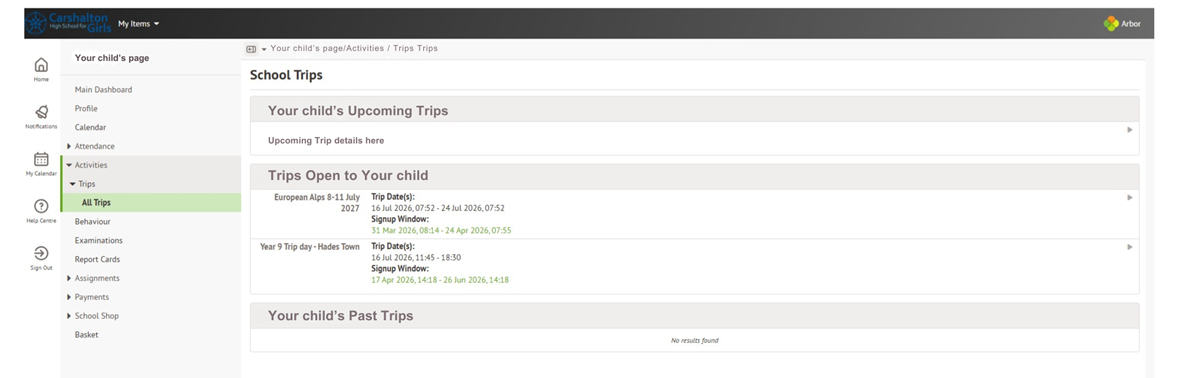
- You will see any trips available for your daughter.
- Click on the trip you wish your child to join.
- If sign-ups are open, a green button will appear saying “Sign up (your daughter’s name) for trip.”
- Click the button and then click the Make Payment or Add Consent button and complete the steps to sign-up. Please make sure the Consent button is ticked.